
You keep your coding skills sharp by practicing the parts of the job that AI now does for you, on purpose and without the assistant. For most engineers that means debugging a problem before asking for help, reading code you didn't write, solving a small problem from a blank file, and writing tests yourself. I'd start with an hour or two a week and keep it regular. The rest of the week you can use AI as much as you like.
TL;DR
- Thinking skills fade more than hands-on skills. Pilots used to flying with automation kept their hands-on flying ability but had more trouble with navigation and fault detection (Casner et al., Human Factors, 2014). For programmers, the closest equivalents are debugging and reading code.
- Skill loss can show up within months. In an observational study, doctors who used AI for colonoscopies found fewer precancerous growths once the AI was switched off, 22.4% down from 28.4% (Budzyń et al., Lancet Gastroenterology & Hepatology, 2025).
- Test yourself regularly. Can you explain the last diff you merged? Can you debug a failing test for 20 minutes without prompting? If not, those are the skills to practice.
- A weekly routine is enough. Solve one small problem by hand, debug before prompting, review AI diffs as if a junior wrote them, read standard library source, and write the tests yourself.
- Ask AI "why", not "fix". Predict the answer first, then compare. Engineers learning a new library who used AI to ask questions learned it about as well as those who coded by hand. Those who handed it the problem learned the least (Anthropic, 2026).
Which skills fade first when AI writes your code?
The skills that fade first are the ones where you have to work something out, like debugging, reading code and weighing trade-offs. Typing syntax fades much more slowly.
Aviation is a useful comparison. In a 2014 study, 16 airline pilots flew a Boeing 747-400 simulator and were tested on flying it by hand. Their hands-on flying skills were "mostly intact". The problems showed up in the thinking tasks: keeping track of the plane's position without the map display, deciding what to do next, and noticing when an instrument had failed (Casner et al., Human Factors, 2014). The researchers suggested that pilots keep those skills by staying actively engaged in supervising the automation.
Medicine found something similar in 2025. Across four endoscopy centres in Poland, doctors who had been using an AI detection tool were measured on colonoscopies done without it. Their adenoma detection rate fell from 28.4% before the AI was introduced to 22.4% afterwards (Budzyń et al., Lancet Gastroenterology & Hepatology, 2025). It was an observational study, not a randomized trial, but the drop happened within months.
In software, that points at five skills.
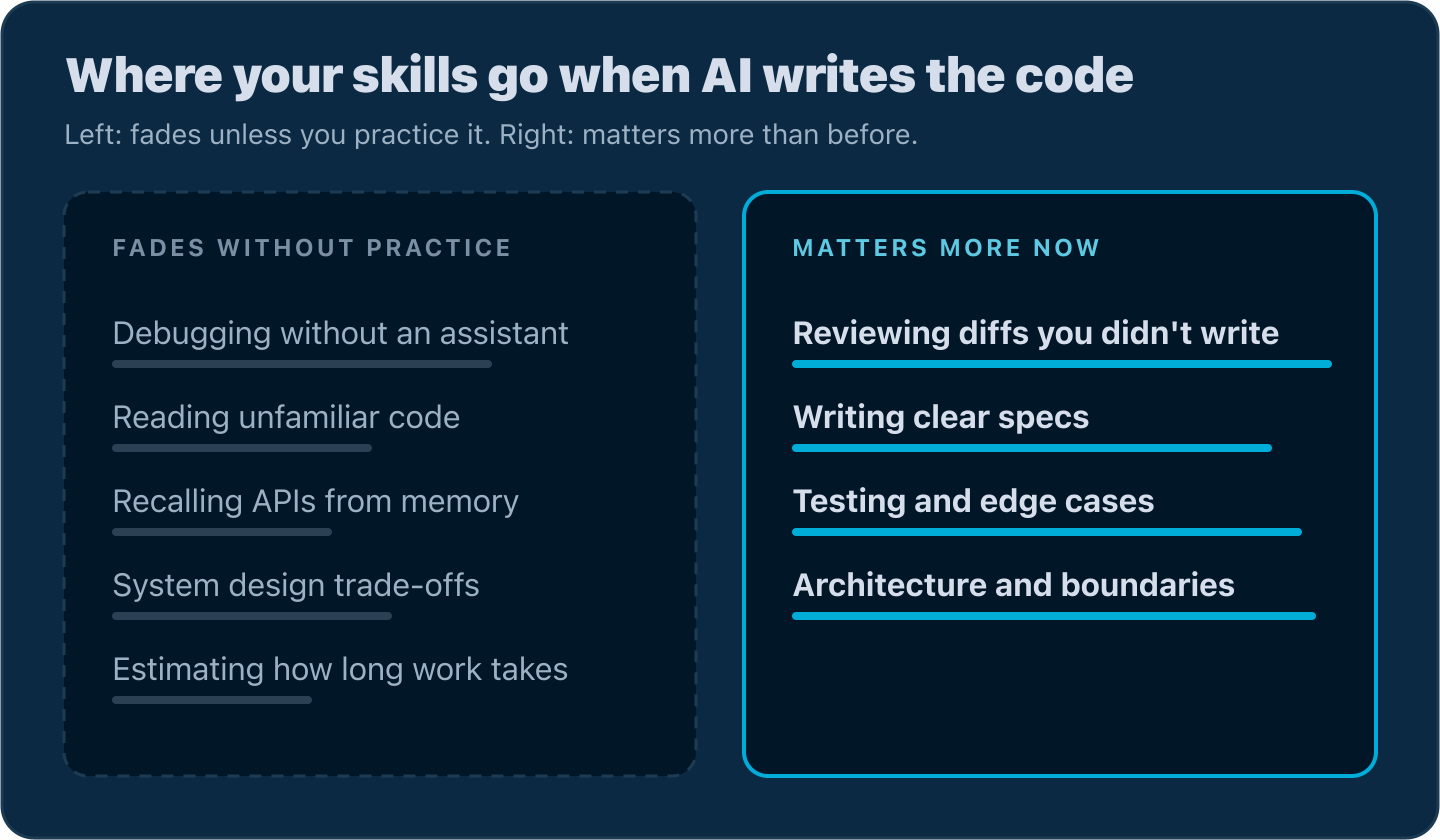
Debugging
Debugging is the one to watch most closely. In Anthropic's 2026 trial, the hand-coding group ran into more errors than the AI group, and the researchers think working through those errors is what built their debugging skill (Anthropic, 2026). If an assistant fixes every error for you, you never get that practice.
Reading unfamiliar code
When an agent explains a codebase to you, you don't build your own map of it. That's fine until the explanation is wrong or the agent isn't available during an incident. GitClear's analysis of 623 million code changes found that calls into existing code fell from 343 to 223 per thousand changed lines between 2023 and 2026 (GitClear, 2026). Less reuse is consistent with less reading of what's already there.
Knowing the APIs from memory
Recall matters less than the other skills here, but you still need some of it. You don't need to memorize every function in strings. You do need to know that context.WithTimeout returns a cancel function you must call, and that http.Error doesn't return from your handler. Without that knowledge, you can't tell when a suggestion is wrong.
System design and trade-offs
AI will propose a design if you ask. Choosing between two reasonable designs takes judgment, and you build judgment by making decisions and living with the results. If the agent picks the queue, the schema and the retry policy, you never find out which of your instincts were right.
Estimating
If an assistant does part of the work, your sense of how long things take can drift. In METR's 2025 trial, experienced developers took 19% longer with AI but believed afterwards that it had made them 20% faster (METR, 2025). If your own sense of speed can be that far off, your estimates can be too.
How do you know your skills are slipping?
You find out by testing yourself without the assistant, because it's hard to notice while you're working with it. Microsoft Research and Carnegie Mellon found that knowledge workers who were more confident in AI reported thinking less critically about its output (Lee et al., CHI, 2025).
Try these checks once a month:
- Explain your last merged diff. Pick a recent pull request that AI mostly wrote. Explain to a colleague, or out loud, why each change is there. If you can't explain a change, you don't really know it.
- Debug for 20 minutes without prompting. Take the next failing test or bug report and work on it with only logs, a debugger and the source. Notice whether you reach for the assistant within the first two minutes.
- Write a small function from a blank file. Parse a config file, retry an HTTP call with backoff, or deduplicate a slice while keeping order. Check whether you remember the standard library calls or have to look up each one.
- Predict before you run. Before running a test, write down whether it will pass. If it fails, write down what the error will say. If you guess wrong a lot, your mental model of the code has drifted from the code.
- Estimate, then measure. Estimate how long a task will take, then compare it with how long it actually took. A widening gap suggests you've lost track of where the time goes.
None of these take long. If they feel uncomfortable, that tells you which skill to practice.
What is the difference between offloading and outsourcing your thinking?
Offloading is handing AI work you already understand, so you can spend your attention elsewhere. Outsourcing is handing it work you don't understand, so you never have to. The first is a normal part of engineering. The second is where skills fade.
Anthropic's trial found that how people used the assistant mattered more than whether they used it, and the researchers concluded that cognitive effort, "and even getting painfully stuck", is likely important for mastery (Anthropic, 2026). Should You Still Write Code by Hand? goes through which usage patterns scored well.
Learning research explains why. Robert and Elizabeth Bjork call this kind of effort a "desirable difficulty": it feels slower at the time but leads to better long-term learning (Bjork & Bjork, 2011). One of their examples is spacing. Practice spread over weeks sticks better than the same amount crammed into one session, which is why the routine below is weekly. Recalling something also beats rereading it (APS Observer on Roediger & Karpicke, 2006), a study Should You Still Write Code by Hand? covers in more detail.
To check which one you did, ask yourself a week later: could I rewrite this code without looking at it? If you could, you offloaded work you understand. If you couldn't, go back and learn it before you build on top of it.
A weekly routine for AI-free practice
The routine below takes one to two hours a week. You can spread it out or do it in one block. The hard part is keeping it going for months.
Hand-solve one small problem
Once a week, open a blank file with the assistant turned off and solve one small, real problem. Pick something close to your work: a rate limiter, a CSV parser that handles quoted fields, a worker pool that stops on the first error. Keep it to 30 to 45 minutes. You're practicing the step from a blank file to working code, so the problem can be small.
If you want problems that come with tests, the Training Ground on LevelUpGo has standalone Go exercises for exactly this.
Debug before prompting
When something breaks, give yourself a fixed amount of time, such as 20 minutes, before you ask the assistant. Form a hypothesis, reproduce the bug, measure, and only then ask.
Here's a bug worth practicing on. A service fetches exchange rates from a slow upstream API and gives up after 10 milliseconds:
example.gogopackage main

import (
	"context"
	"errors"
	"fmt"
	"os"
	"runtime"
	"runtime/pprof"
	"time"
)

type Rate struct {
	Currency string
	Value    float64
}

func fetchRate(currency string) Rate {
	time.Sleep(50 * time.Millisecond) // a slow upstream API
	return Rate{Currency: currency, Value: 1.08}
}

func rateWithTimeout(ctx context.Context, currency string) (Rate, error) {
	ctx, cancel := context.WithTimeout(ctx, 10*time.Millisecond)
	defer cancel()

	result := make(chan Rate)
	go func() {
		result <- fetchRate(currency)
	}()

	select {
	case r := <-result:
		return r, nil
	case <-ctx.Done():
		return Rate{}, errors.New("rate lookup timed out")
	}
}

func main() {
	timeouts := 0
	for range 100 {
		if _, err := rateWithTimeout(context.Background(), "EUR"); err != nil {
			timeouts++
		}
	}
	fmt.Println("timeouts:", timeouts)
	time.Sleep(100 * time.Millisecond)
	runtime.GC()
	fmt.Println("goroutines:", runtime.NumGoroutine())
	pprof.Lookup("goroutineleak").WriteTo(os.Stdout, 1)
}
In production the symptom is slow memory growth, not a crash. The first measurement to take is the goroutine count. Go 1.27 made the goroutineleak profile generally available (Go 1.27 release notes), so the runtime can point at the leak for you. Running the program on Go 1.27 prints:
example.texttexttimeouts: 100
goroutines: 101
goroutineleak profile: total 100
100 @ 0x1048c59a8 0x10485e854 0x10485e468 0x10491c5ac 0x1048cbc74
#	0x10491c5ab	main.rateWithTimeout.func1+0x5b	./main.go:29
All 100 lookups timed out, and 100 goroutines are still alive besides main. Line 29 is result <- fetchRate(currency). Every lookup that times out leaves a goroutine behind, blocked on a send that nobody will ever receive, because rateWithTimeout has already returned. The fix is a buffer of one, so the send always succeeds:
example.gogoresult := make(chan Rate, 1)
With that change the same program prints goroutines: 1 and goroutineleak profile: total 0. An assistant would probably find this bug quickly. The practice is in finding it yourself, because the next leak might be in a library the assistant has never seen, during an incident where you're on your own. The Go chan keyword covers the channel rules behind this bug in more depth.
Review the AI's diff as if a junior wrote it
When an agent opens a pull request, read it the way you'd read one from a new team member who's smart but doesn't know your system. Don't just ask whether it looks right. Ask what it assumed. Check error paths, context handling, locking, and what happens on the second call.
Trust in these tools is already low. In Stack Overflow's 2025 survey, 84% of respondents used or planned to use AI tools, but only 3.1% highly trusted their accuracy (Stack Overflow, 2025). Google's DORA team found that AI doesn't fix a team. It "amplifies what's already there" (DORA 2025, 2025). For what happens when review breaks down, The Dark Side of AI Coding Tools goes through the 2026 data.
Read standard library source
Once a week, read one function from the Go standard library. It's carefully written, and the doc comments often explain the design decisions. Nothing needs installing:
example.bashbashgo doc -src net/http.Error
example.gogo// Error replies to the request with the specified error message and HTTP code.
// It does not otherwise end the request; the caller should ensure no further
// writes are done to w.
// The error message should be plain text.
//
// Error deletes the Content-Length header,
// sets Content-Type to “text/plain; charset=utf-8”,
// and sets X-Content-Type-Options to “nosniff”.
// This configures the header properly for the error message,
// in case the caller had set it up expecting a successful output.
func Error(w ResponseWriter, error string, code int) {
	h := w.Header()
	// ...
	h.Del("Content-Length")
	h.Set("Content-Type", "text/plain; charset=utf-8")
	h.Set("X-Content-Type-Options", "nosniff")
	w.WriteHeader(code)
	fmt.Fprintln(w, error)
}
The second line of the comment explains a common bug: http.Error writes a response but doesn't stop your handler. If you leave out the return after it, the handler keeps running. Here's a handler with exactly that mistake in the JSON decoding branch:
example.gogotype Order struct {
	ID       string `json:"id"`
	Quantity int    `json:"quantity"`
}

func createOrder(w http.ResponseWriter, r *http.Request) {
	var o Order
	if err := json.NewDecoder(r.Body).Decode(&o); err != nil {
		http.Error(w, "invalid JSON", http.StatusBadRequest)
	}
	if o.Quantity <= 0 {
		http.Error(w, "quantity must be positive", http.StatusBadRequest)
		return
	}
	w.WriteHeader(http.StatusCreated)
	json.NewEncoder(w).Encode(o)
}
Suggestions like this pass a quick review because the second branch looks correct. Once you've read the source, the missing return stands out. Good next reads are sync.Once.Do, errors.Is, context.WithCancel and http.MaxBytesReader.
Write the tests yourself
Let the assistant write the implementation if you like, but write the test cases yourself. Deciding what counts as correct is the part of the work you shouldn't hand off. Here's a table-driven test for the handler above:
example.gogofunc TestCreateOrder(t *testing.T) {
	tests := []struct {
		name     string
		body     string
		wantCode int
		wantBody string
	}{
		{"valid order", `{"id":"A1","quantity":2}`, http.StatusCreated, `{"id":"A1","quantity":2}` + "\n"},
		{"zero quantity", `{"id":"A1","quantity":0}`, http.StatusBadRequest, "quantity must be positive\n"},
		{"malformed JSON", `{"id":`, http.StatusBadRequest, "invalid JSON\n"},
	}
	for _, tt := range tests {
		t.Run(tt.name, func(t *testing.T) {
			req := httptest.NewRequest(http.MethodPost, "/orders", strings.NewReader(tt.body))
			rec := httptest.NewRecorder()

			createOrder(rec, req)

			res := rec.Result()
			body, _ := io.ReadAll(res.Body)
			if res.StatusCode != tt.wantCode {
				t.Errorf("status = %d, want %d", res.StatusCode, tt.wantCode)
			}
			if string(body) != tt.wantBody {
				t.Errorf("body = %q, want %q", body, tt.wantBody)
			}
		})
	}
}
example.texttext--- FAIL: TestCreateOrder (0.00s)
    --- FAIL: TestCreateOrder/malformed_JSON (0.00s)
        handler_test.go:35: body = "invalid JSON\nquantity must be positive\n", want "invalid JSON\n"
FAIL
The status check passes, because the first WriteHeader call wins and the response is still a 400. Only the body check catches the bug. A real server would also log http: superfluous response.WriteHeader call, but only if someone reads the logs. Writing that body assertion is a judgment about what could go wrong, and that judgment is the skill you're practicing. With the return added, all three cases pass.
How should you use AI so it teaches you instead of replacing you?
Use AI to test and explain your thinking, and do the thinking yourself first. Five habits help with that:
- Predict first, then compare. Before asking for a solution, write down your own approach in a sentence or two, or sketch the code. Then ask the assistant and compare. The differences show you what you didn't know.
- Ask "why" instead of "fix". "Why does this goroutine never exit?" gets you an explanation you can check. "Fix this" gets you a patch you'll accept without learning anything.
- Ask for hints. Tell the assistant you're practicing and want one hint at a time. Most assistants will go along with that.
- Have it quiz you. After a session, ask for three questions about the code you just changed. If you can't answer them, read the code again.
- Rewrite from memory. When you accept generated code you didn't fully understand, close it and write it again later that day. The places where you get stuck are the parts you didn't learn.
The same idea applies when you're learning from scratch. How to Learn to Code in 2026 covers using AI as a tutor for beginners.
Which skills matter more now, not less?
The skills you need to direct AI and check its work are worth more now than before.
Reviewing is the obvious one. Agents can open pull requests faster than a team can read them, and someone still has to review each one and decide which to merge.
Writing specs is another. A clear description of the problem, the constraints and the edge cases gets you better output from an agent, and writing it forces you to think the problem through.
Testing matters more when you didn't write the code. Tests are how you tell an agent what correct means and how you catch it when it's wrong, so table-driven tests, fuzzing (Go fuzzing tutorial) and the race detector all get more use.
Architecture is the last. Agents work well inside clear boundaries, but deciding where those boundaries go, which package owns what and which interfaces stay stable, is still your job.
Language choice helps with all four. Go's strict compiler, small language and built-in tooling catch a lot of generated mistakes before review, which Why Go Is the Best Language for AI-Written Code covers in detail. Is Go Worth Learning in 2026? covers the career side of that choice.
Where LevelUpGo fits
LevelUpGo is a place to do the AI-free part of the routine. Each lesson puts the concept on the left and a real editor on the right, with no autocomplete, and you move on only when your Go code compiles and passes the tests. The Go Basics course, free to start, begins from the fundamentals. Professional Go Testing is where you practice writing table-driven tests yourself, and Concurrency Fundamentals covers goroutines, channels and cancellation, the code most worth being able to debug by hand.
FAQ
How much time should I spend coding without AI each week?
I'd start with one to two hours a week and keep it up for months. Learning research favors short, spaced sessions over occasional long ones (Bjork & Bjork, 2011). One small problem solved by hand, one bug debugged before prompting, and one standard library function read each week covers the skills most at risk.
How do I practice when my team expects AI-speed output?
Do the practice outside the critical path. Pick bugs and tickets that aren't blocking anyone for the debug-first habit, and do the hand-solved problem on your own time or in a learning budget if your company has one. Reviewing diffs and writing the tests yourself fit into normal work and barely slow you down. If your team measures only output, raise review quality and on-call readiness with your lead. Both depend on the same skills.
Do senior engineers lose skills to AI too?
Yes. Experience doesn't protect you. The pilots in the aviation study and the doctors in the colonoscopy study were experienced professionals, and both groups showed weaker skills where automation had taken over part of the work (Casner et al., 2014, Budzyń et al., 2025). Seniors start with more skill to lose, and the thinking skills are the ones to watch.
Is reviewing AI code enough to keep my skills?
Not on its own. Reviewing uses recognition, which is easier than producing a solution yourself. You can recognize a correct answer long after you've lost the ability to write it. Pair reviewing with regular practice writing and debugging code from scratch.
Can skills lost to AI come back?
The research here is thin, so nobody can promise it. The studies above measured skill at one point in time, not recovery. What they do show is that skills people kept using stayed intact, like the pilots' hands-on flying (Casner et al., 2014). The practical answer is to start with the self-checks above, find the weakest skill, and practice that one first.
Sources
- Anthropic, "How AI assistance impacts the formation of coding skills" (2026): https://www.anthropic.com/research/AI-assistance-coding-skills
- Casner, Geven, Recker & Schooler, "The retention of manual flying skills in the automated cockpit," Human Factors (2014): https://labs.psych.ucsb.edu/schooler/jonathan/sites/labs.psych.ucsb.edu.schooler.jonathan/files/pubs/the_retention_of_manual_flying_skills_in_the_automated_cockpit.pdf
- Budzyń et al., "Endoscopist deskilling after exposure to artificial intelligence in colonoscopy," Lancet Gastroenterology & Hepatology (2025): https://doi.org/10.1016/S2468-1253(25)00133-5
- GitClear, "The Maintainability Gap: 2026 AI Code Quality Research" (2026): https://www.gitclear.com/the_ai_code_quality_maintainability_gap
- METR, "Measuring the Impact of Early-2025 AI on Experienced Open-Source Developer Productivity" (2025): https://metr.org/blog/2025-07-10-early-2025-ai-experienced-os-dev-study/
- Lee et al., "The Impact of Generative AI on Critical Thinking," CHI (2025): https://www.microsoft.com/en-us/research/publication/the-impact-of-generative-ai-on-critical-thinking-self-reported-reductions-in-cognitive-effort-and-confidence-effects-from-a-survey-of-knowledge-workers/
- APS Observer, "Test-enhanced Learning," on Roediger & Karpicke (2006): https://www.psychologicalscience.org/observer/test-enhanced-learning
- Bjork & Bjork, "Making Things Hard on Yourself, But in a Good Way: Creating Desirable Difficulties to Enhance Learning" (2011): https://bjorklab.psych.ucla.edu/wp-content/uploads/sites/13/2016/04/EBjork_RBjork_2011.pdf
- Stack Overflow Developer Survey 2025, AI section: https://survey.stackoverflow.co/2025/ai
- Google Cloud, "Announcing the 2025 DORA Report" (2025): https://cloud.google.com/blog/products/ai-machine-learning/announcing-the-2025-dora-report
- Go 1.27 release notes: https://go.dev/doc/go1.27
- Go fuzzing tutorial: https://go.dev/doc/tutorial/fuzz