
Next.js can now run Go route handlers. You put a route.go file in the app folder where a route.ts would go, export a function named after the HTTP method, and Next.js compiles it and serves it from its own Go process. It is experimental and only in the 16.5 canary releases.
The point is CPU-heavy server work. The React app stays in TypeScript, and the slow endpoints move to Go without a separate backend to deploy.
I built a demo app with every feature side by side in Go and TypeScript and benchmarked both. This post walks through that code, what happens under the hood, the limits, and the numbers.
TL;DR
- A Go route is a plain
net/httphandler. You exportGET(w http.ResponseWriter, r *http.Request)fromroute.go, and Next.js generates themain(). If you know the standard library, you already know the API. - Each Go route is its own native binary and process.
next buildcompiles every route to an executable of about 9 MB, which runs without Go installed on the server. Node still sits in front and forwards the request. - CPU-heavy routes got much faster. At 50 concurrent requests on a 10-core M2 Pro, a prime-counting route went from 8.5 req/s in TypeScript to 89.9 req/s in Go, and a sales report from 10.8 to 70.9 req/s. Most of that gap is Go using all the cores while one Node process uses one.
- Some apps can't use it yet. There are no runtime file reads (use
go:embed), no WebSockets, no cgo, no cross-compiling, nooutput: 'standalone', and no module downloads during the build. - Wait for a stable release before production. It is a good fit for the slow endpoints of an existing Next.js app. For a new app, a separate Go API is still my pick.
What shipped, and when
Tim Neutkens from the Next.js team posted on X on 30 October 2026: "We're prototyping native language support in Next.js, starting with Route Handlers and Proxy in Go. This gives you more options for CPU intensive workloads on the server, alongside your React app."
Two releases followed:
- Route handlers: vercel/next.js#100130 "support App Router route.go handlers" was merged on 3 November 2026 and shipped the same day in
16.5.0-canary.40. - Go proxy: #101464 was merged on 16 November and released in
16.5.0-canary.53, behind the same flag.
This post covers route handlers, which I tested. In the demo, proxy.ts runs in Node before the Go route, so headers it sets reach Go (shown further down).
Canary means experimental. The flag, the file layout and the generated helpers can all change before a stable release.
The route.go reference lives in the Next.js repo on the canary branch and isn't on nextjs.org yet.
Requirements and setup
- Go 1.24 or newer on
PATH(or in theTURBOPACK_GOenvironment variable) fornext devandnext build.next startruns the compiled routes without the Go compiler. - Node.js to run Next.js itself.
- Turbopack, the default bundler in Next.js 16. A project that still builds with Webpack can't use Go routes.
Create a project on the canary channel:
example.bashbashnpx create-next-app@canary my-app
Then turn the feature on in next.config.ts. This is the demo's config, which also adds a rewrite used later in the post:
example.tstsimport type { NextConfig } from 'next'

const nextConfig: NextConfig = {
  experimental: { goRoutes: true },
  // Rewrites run in Node. Each route sees the final URL, such as /go/items/from-rewrite?sort=asc
  async rewrites() {
    return [
      { source: '/alias', destination: '/go/items/from-rewrite' },
      { source: '/alias-ts', destination: '/typescript/items/from-rewrite' },
    ]
  },
}

export default nextConfig
All code below comes from the demo app, which ran on 16.5.0-canary.40 with Go 1.27.1 and Node 24.20. I re-checked every route on 16.5.0-canary.45 and got the same results.
The demo keeps Go routes under app/go/ and their TypeScript twins under app/typescript/. Those folder names are only for the demo, not a Next.js convention.
Your first route.go
The file app/go/api/hello/route.go serves GET /go/api/hello:
example.gogopackage main

import (
	"encoding/json"
	"net/http"
)

func GET(w http.ResponseWriter, r *http.Request) {
	w.Header().Set("Content-Type", "application/json")
	json.NewEncoder(w).Encode(map[string]string{"message": "Hello from Go!"})
}
example.bashbash$ curl localhost:3000/go/api/hello
{"message":"Hello from Go!"}
The package is main, but there is no main() function. Next.js generates one around your handlers when it builds the route. The function name picks the HTTP method, the same way it does in TypeScript, and the signature is an ordinary http.HandlerFunc.
The TypeScript version is shorter because Response.json sets the content type for you:
example.tstsexport function GET() {
  return Response.json({ message: 'Hello from TypeScript!' })
}
Go has no such helper out of the box, but writing one takes four lines. Put it in a sibling file in the same folder (any .go file next to route.go is part of the same package main) or in a package in your module:
example.gogofunc writeJSON(w http.ResponseWriter, status int, v any) error {
	w.Header().Set("Content-Type", "application/json")
	w.WriteHeader(status)
	return json.NewEncoder(w).Encode(v)
}
The dev loop
In next dev, saving a route.go file recompiles it and the next request gets the new code with no restart.
Dynamic and catch-all segments
Dynamic segments use the same bracket folders as TypeScript. In Go you read them with r.PathValue, the method the standard library added for its own routing patterns in Go 1.22. This is app/go/items/[slug]/route.go:
example.gogopackage main

import (
	"fmt"
	"net/http"
)

func GET(w http.ResponseWriter, r *http.Request) {
	fmt.Fprintf(w, "Item %s", r.PathValue("slug"))
}
example.bashbash$ curl localhost:3000/go/items/keyboard
Item keyboard
A catch-all segment like app/go/blog/[...slug]/route.go matches everything after /go/blog/. r.PathValue gives you that as one string. Next.js also generates a ParamValues helper into the package, which returns the segments as a slice:
example.gogopackage main

import (
	"encoding/json"
	"net/http"
)

// /go/blog/golang/first-post and /go/blog/ci%2Fcd/deploy-go
// ParamValues is generated by Next.js, you don't write it.
func GET(w http.ResponseWriter, r *http.Request) {
	w.Header().Set("Content-Type", "application/json")
	json.NewEncoder(w).Encode(map[string]any{
		"pathValue":   r.PathValue("slug"),
		"paramValues": ParamValues(r, "slug"),
	})
}
The difference shows up when a segment contains an encoded slash:
example.bashbash$ curl localhost:3000/go/blog/golang/first-post
{"paramValues":["golang","first-post"],"pathValue":"golang/first-post"}

$ curl localhost:3000/go/blog/ci%2Fcd/deploy-go
{"paramValues":["ci/cd","deploy-go"],"pathValue":"ci/cd/deploy-go"}
From r.PathValue alone you can't tell whether ci and cd were two segments or one. ParamValues keeps ci/cd as one value, which matches what the TypeScript params object gives you.
Query parameters
Query strings come from r.URL.Query(), which returns a url.Values map. This is app/go/api/search/route.go:
example.gogopackage main

import (
	"encoding/json"
	"net/http"
)

// /go/api/search?query=hello&tag=go&tag=next
func GET(w http.ResponseWriter, r *http.Request) {
	query := r.URL.Query()
	w.Header().Set("Content-Type", "application/json")
	json.NewEncoder(w).Encode(map[string]any{
		"query": query.Get("query"),
		"tags":  query["tag"],
	})
}
example.bashbash$ curl 'localhost:3000/go/api/search?query=hello&tag=go&tag=next'
{"query":"hello","tags":["go","next"]}

$ curl localhost:3000/go/api/search
{"query":"","tags":null}
The two ways of reading a value behave differently when the parameter is missing. Get returns the first value or an empty string. Indexing the map returns every value as a slice, or nil, which encodes as JSON null. The TypeScript side uses searchParams.get with ?? '' and getAll for the same result.
POST bodies and size limits
Reading a JSON body with a size limit is where the standard library saves the most code. This is app/go/api/notes/route.go:
example.gogopackage main

import (
	"encoding/json"
	"errors"
	"net/http"
)

type note struct {
	Text string `json:"text"`
}

func POST(w http.ResponseWriter, r *http.Request) {
	r.Body = http.MaxBytesReader(w, r.Body, 1<<20) // 1 MB limit
	var n note
	err := json.NewDecoder(r.Body).Decode(&n)
	var tooLarge *http.MaxBytesError
	if errors.As(err, &tooLarge) {
		http.Error(w, "body too large, the limit is 1 MB", http.StatusRequestEntityTooLarge)
		return
	}
	if err != nil {
		http.Error(w, "invalid JSON", http.StatusBadRequest)
		return
	}
	w.Header().Set("Content-Type", "application/json")
	json.NewEncoder(w).Encode(n)
}
http.MaxBytesReader wraps the body and fails the read once it passes the limit. errors.As checks for *http.MaxBytesError, so an oversized body gets a 413 and broken JSON gets a 400. In the demo, a valid note echoes back, and a 2 MB body returns 413 with "body too large, the limit is 1 MB".
The TypeScript route has no built-in body limit, so it counts the bytes itself:
example.tstsconst LIMIT = 1 << 20 // 1 MB limit

type Note = { text: string }

class BodyTooLargeError extends Error {}

// Go has http.MaxBytesReader for this. Here we count the bytes ourselves
// and stop reading as soon as the body goes over the limit.
async function readBody(request: Request) {
  const reader = request.body?.getReader()
  const chunks: Uint8Array[] = []
  let size = 0
  while (reader) {
    const { done, value } = await reader.read()
    if (done) break
    size += value.length
    if (size > LIMIT) {
      await reader.cancel()
      throw new BodyTooLargeError()
    }
    chunks.push(value)
  }
  return Buffer.concat(chunks).toString('utf8')
}

export async function POST(request: Request) {
  try {
    const note: Note = JSON.parse(await readBody(request))
    return Response.json(note)
  } catch (error) {
    if (error instanceof BodyTooLargeError) {
      return new Response('body too large, the limit is 1 MB', { status: 413 })
    }
    return new Response('invalid JSON', { status: 400 })
  }
}
You write that helper once and reuse it, so it's not a big cost. Form parsing below works the same way: the Go side is one standard library call.
Forms, HEAD, OPTIONS and 405
Forms work through r.ParseMultipartForm and r.FormValue, with the same http.MaxBytesReader in front. This is app/go/api/form/route.go:
example.gogopackage main

import (
	"encoding/json"
	"net/http"
)

func POST(w http.ResponseWriter, r *http.Request) {
	r.Body = http.MaxBytesReader(w, r.Body, 1<<20) // 1 MB limit
	if err := r.ParseMultipartForm(1 << 20); err != nil {
		http.Error(w, "Invalid form data", http.StatusBadRequest)
		return
	}
	w.Header().Set("Content-Type", "application/json")
	json.NewEncoder(w).Encode(map[string]string{"name": r.FormValue("name")})
}
A form with name=gopher returns {"name":"gopher"}. A JSON body sent to the same route returns 400 Invalid form data.
You don't write HEAD or OPTIONS handlers. A route that exports only GET and POST gets the rest from Next.js:
example.bashbash$ curl -I localhost:3000/go/api/methods
HTTP/1.1 200 OK

$ curl -i -X OPTIONS localhost:3000/go/api/methods
HTTP/1.1 204 No Content
allow: GET, HEAD, OPTIONS, POST

$ curl -i -X DELETE localhost:3000/go/api/methods
HTTP/1.1 405 Method Not Allowed
HEAD runs the GET handler and drops the body. A method you didn't export gets a 405.
Streaming responses, and the gzip catch
Streaming uses http.Flusher, as it would in any Go server. This is app/go/api/stream/route.go, which sends ten chunks 200 ms apart and stops early if the client disconnects:
example.gogopackage main

import (
	"fmt"
	"net/http"
	"time"
)

func GET(w http.ResponseWriter, r *http.Request) {
	flusher, ok := w.(http.Flusher)
	if !ok {
		http.Error(w, "Streaming unavailable", http.StatusInternalServerError)
		return
	}
	w.Header().Set("Content-Type", "text/plain; charset=utf-8")
	// Without this, Next.js gzips for browsers and holds the chunks back.
	w.Header().Set("Cache-Control", "no-transform")
	ticker := time.NewTicker(200 * time.Millisecond)
	defer ticker.Stop()
	for i := 0; i < 10; i++ {
		select {
		case <-r.Context().Done():
			return
		case <-ticker.C:
			fmt.Fprintf(w, "Chunk %d\n", i+1)
			flusher.Flush()
		}
	}
}
You only find out you need the Cache-Control: no-transform line when you test in a browser. Without it, curl -N shows one chunk every 200 ms, because curl doesn't ask for gzip.
A browser sends Accept-Encoding: gzip, and Next.js then compresses the text/plain response from the Go route and buffers it. In Chrome all ten chunks arrived together at the end, two seconds after the request. A TypeScript route with the same stream was not affected.
no-transform tells Next.js not to compress that response. With it, Chrome got one chunk every 200 ms in both next dev and next start, on canary.40 and canary.45. Two other options:
compress: falseturns compression off for the whole app. It works, but it changes every other response too.- A content type Next.js doesn't compress, like
application/x-ndjson, streams fine without the header.
State lives in one process per route
Each Go route runs in its own process, which Next.js starts on the first request to that route. Package-level variables live as long as that process. The demo's counter route keeps a count in a sibling file, counter.go, in the same package main:
example.gogopackage main

import "sync"

// In-memory state. It lives as long as the worker process,
// so it resets when you edit the route or the worker restarts.
var (
	mu    sync.Mutex
	count int
)

func current() int {
	mu.Lock()
	defer mu.Unlock()
	return count
}

func increment() int {
	mu.Lock()
	defer mu.Unlock()
	count++
	return count
}
example.gogopackage main

import (
	"encoding/json"
	"net/http"
)

// The state lives in counter.go, a sibling file in the same package main.
func GET(w http.ResponseWriter, r *http.Request) {
	writeCount(w, current())
}

func POST(w http.ResponseWriter, r *http.Request) {
	writeCount(w, increment())
}

func writeCount(w http.ResponseWriter, n int) {
	w.Header().Set("Content-Type", "application/json")
	json.NewEncoder(w).Encode(map[string]int{"count": n})
}
POST five times and GET returns {"count":5}. The count is shared between requests to this route and no other. A second Go route runs in a different process and can't see it.
The count is lost or split in these cases:
- In dev, editing the route restarts the process and the count goes back to 0.
- In production, the same happens whenever the process dies or the server restarts.
- Two
next startinstances each keep their own count.
Anything that has to survive belongs in a database or a cache, as it would in TypeScript.
Why the Go counter needs a mutex and the TypeScript one doesn't
The TypeScript counter is just let count = 0 and count++, with no lock. JavaScript runs your route code on one thread, so two requests never execute count++ at the same moment.
Go serves each request in its own goroutine, and goroutines run in parallel on different cores. If two requests read count at the same time and both write back the value plus one, one increment is lost. The sync.Mutex makes the read and write happen one request at a time.
I checked the parallelism directly: five requests to a Go route that sleeps for one second finished in 1.09 seconds in total.
This is the biggest mental change for a TypeScript developer, and the same parallelism explains the benchmark results below. To practice it, the Concurrency Fundamentals course covers goroutines, mutexes and data races, and go test -race catches the lost-update bug above.
What happens under the hood
One native binary per route
next build compiles each Go route into its own executable. On my M2 Pro each was a Mach-O 64-bit executable arm64 of about 9 MB under .next/server/app/.../route-<hash>, next to a route.native.json file.
I removed Go from PATH and ran next start, and every Go route still worked. You need Go to build, not to run.
At runtime Node still handles the incoming request and forwards it to the route's process over a local connection. Inside Go, r.RemoteAddr is 127.0.0.1:<port>, not the client's address.
Headers, proxy.ts and rewrites
The demo's proxy.ts adds a header before the request goes to Go:
example.tstsimport { NextResponse, type NextRequest } from 'next/server'

// proxy.ts still runs in Node, before the request is forwarded to Go.
export function proxy(request: NextRequest) {
  const headers = new Headers(request.headers)
  headers.set('x-from-proxy', 'set by proxy.ts')
  return NextResponse.next({ request: { headers } })
}

export const config = {
  matcher: ['/go/api/whoami', '/typescript/api/whoami'],
}
A Go route that echoes headers back shows what arrives. The client sends x-hello and also tries to set x-next-internal-go-token, a header Next.js reserves for its own Node to Go traffic:
example.bashbash$ curl -H 'x-hello: world' -H 'x-next-internal-go-token: fake' localhost:3000/go/api/whoami
{"remoteAddr":"127.0.0.1:59190","x-from-proxy":"set by proxy.ts","x-hello":"world","x-next-internal-go-token":""}
Client headers pass through, the proxy.ts header arrives, and the reserved token is stripped.
Rewrites from next.config.ts work too: /alias?sort=asc reaches Go as /go/items/from-rewrite and returns Item from-rewrite.
Panics vs os.Exit
The crash route returns its process ID, panics on ?mode=panic and calls os.Exit(1) on ?mode=exit:
example.gogopackage main

import (
	"encoding/json"
	"net/http"
	"os"
)

// GET  /go/api/crash            -> returns the worker's process ID
// GET  /go/api/crash?mode=panic -> panics: only this connection is aborted
// GET  /go/api/crash?mode=exit  -> kills the worker: the next request starts a new one
func GET(w http.ResponseWriter, r *http.Request) {
	switch r.URL.Query().Get("mode") {
	case "panic":
		panic("boom")
	case "exit":
		os.Exit(1)
	}
	w.Header().Set("Content-Type", "application/json")
	json.NewEncoder(w).Encode(map[string]int{"pid": os.Getpid()})
}
example.bashbash$ curl localhost:3000/go/api/crash                       # {"pid":87553}
$ curl localhost:3000/go/api/crash?mode=panic            # 500
$ curl localhost:3000/go/api/crash                       # {"pid":87553}
$ curl localhost:3000/go/api/crash?mode=exit             # 500
$ curl localhost:3000/go/api/crash                       # {"pid":41331}
The two failures behave differently:
- A panic costs one request.
net/httprecovers it, that connection is aborted, Next.js returns a 500, and the process keeps running with the same PID. os.Exitkills the process. Next.js starts a new one on the next request.
That is a reason to keep log.Fatal and os.Exit out of handler code, since they also wipe any in-memory state like the counter above.
Limitations
The route.go reference lists the build and runtime limits. These are the ones most likely to affect a real app:
- No runtime file reads. The build doesn't trace files your Go code opens at runtime, so they aren't copied into
.next. In my testos.ReadFileonly worked while theappfolder was still on disk. Embed the file into the binary instead. - No WebSockets. WebSocket upgrades and HTTP trailers are unsupported.
- No cgo. Routes build with
CGO_ENABLED=0, so packages that wrap C libraries won't build. - No cross-compiling. The build targets the build host's OS and CPU architecture. A Mac build won't run on a Linux server, so build in CI on the target platform or in the production Docker image.
- No module downloads. The build doesn't fetch Go modules or touch
go.modandgo.sum. Dependencies must already be in the module cache, for example from ago mod downloadstep beforenext build. Go workspaces,replacedirectives and vendoring are also unsupported. - No standalone output.
output: 'standalone'and static export don't work. For self-hosting you copy the whole.nextfolder and keep the executable permissions. - Environment comes from the process. Go reads real environment variables with
os.Getenv. Theenvinlining innext.configdoesn't reach it.
This is the go:embed version of a file read, from app/go/api/embed/route.go:
example.gogopackage main

import (
	_ "embed"
	"net/http"
)

// Runtime file reads are not traced by the build, so ship files with go:embed.
//
//go:embed message.txt
var message string

func GET(w http.ResponseWriter, r *http.Request) {
	w.Header().Set("Content-Type", "text/plain; charset=utf-8")
	w.Write([]byte(message))
}
Benchmarks: route.ts vs route.go
I compared three pairs of routes doing the same work in both languages:
- Primes: count the primes up to 1,000,000 by trial division. Pure CPU.
- Hello: return a tiny JSON object. This measures the overhead of the Node to Go hop.
- Report: a sales dashboard. Parse 20,000 sample orders, total revenue by country and month, rank the top products, and compare every product pair across 4,000 customers with cosine similarity.
The prime loop is the same in both languages. This is the Go side:
example.gogofunc countPrimes(n int) int {
	count := 0
	for i := 2; i <= n; i++ {
		prime := true
		for j := 2; j*j <= i; j++ {
			if i%j == 0 {
				prime = false
				break
			}
		}
		if prime {
			count++
		}
	}
	return count
}
| Route | Concurrency | route.ts req/s | route.go req/s | route.ts p99 | route.go p99 |
|---|---|---|---|---|---|
| Primes | 1 | 8.4 | 17.4 | 229 ms | 141 ms |
| Primes | 50 | 8.5 | 89.9 | 9.66 s | 1.18 s |
| Report | 1 | 10.8 | 16.1 | 215 ms | 186 ms |
| Report | 50 | 10.8 | 70.9 | 5.05 s | 2.11 s |
| Hello | 1 | 3,806 | 4,145 | 1.4 ms | 0.9 ms |
| Hello | 50 | 5,448 | 8,985 | 36.5 ms | 21.3 ms |
Go also used more memory under load. At 50 concurrent requests the report's Go process used 595 MB next to Node's 227 MB, because 50 reports were in flight at once.
The TypeScript version used 326 MB in a single Node process while it worked through them one at a time.
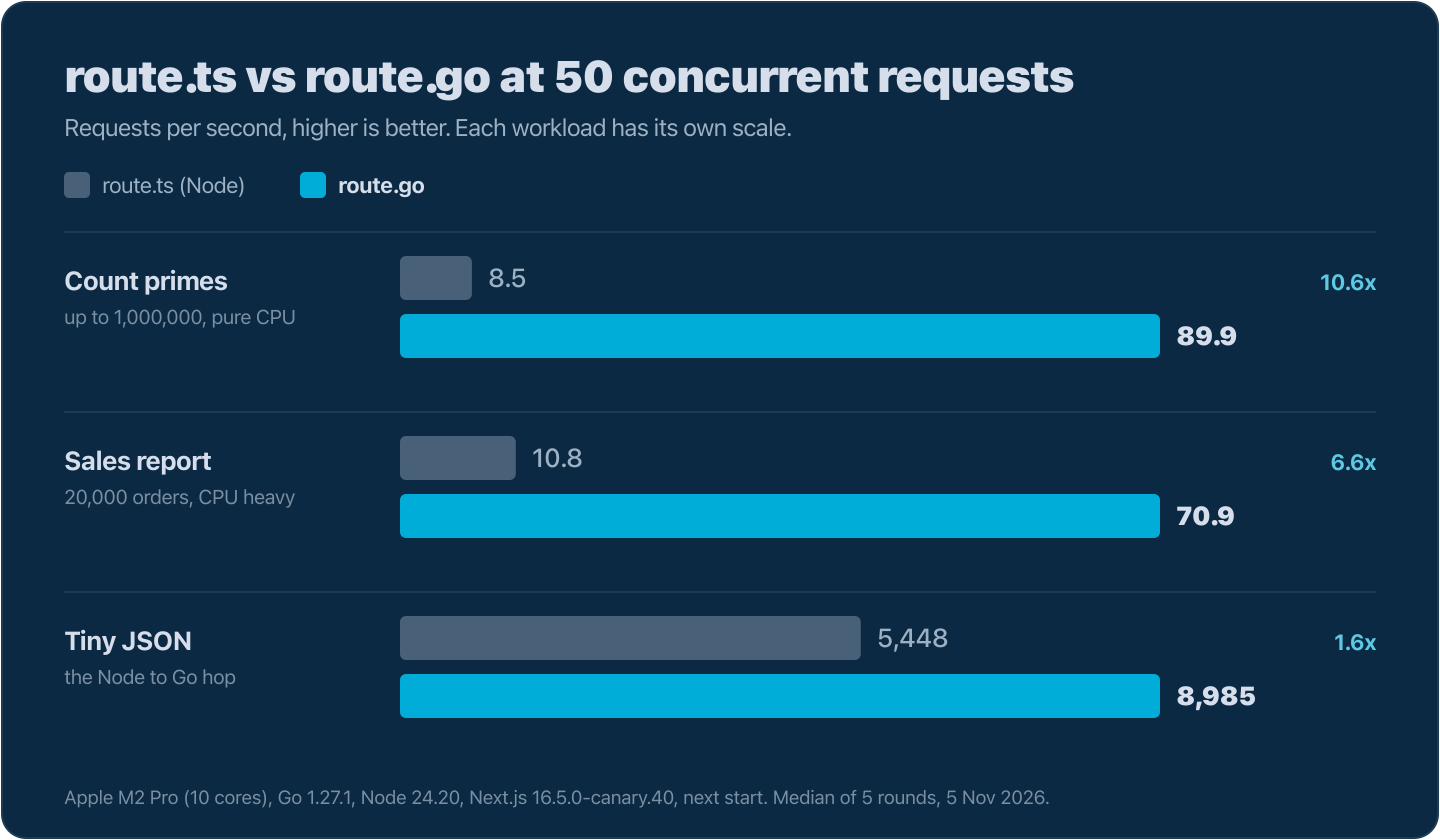
Most of the gap comes from using every core
- One request at a time: Go was about twice as fast on primes and 1.5 times as fast on the report.
- 50 concurrent requests: the gap grew to 6.6 times on the report and 10.6 times on primes.
Go got faster under load and Node didn't, because one Node process runs your route code on one core and the Go process spreads goroutines across all ten.
Two more setups separate the two effects:
| Setup | Concurrency | req/s | p99 | Memory |
|---|---|---|---|---|
Primes, route.go with GOMAXPROCS=1 | 50 | 17.6 | 4.16 s | 12 MB Go |
Primes, route.ts on 10 next start processes | 50 | 44.0 | 2.48 s | 1,170 MB Node |
Report, route.go with GOMAXPROCS=1 | 50 | 14.5 | 6.02 s | 491 MB Go |
Report, route.ts on 10 next start processes | 50 | 48.7 | 2.22 s | 2,382 MB Node |
- Go pinned to one core with
GOMAXPROCS=1fell back to its single-request speed: still about twice as fast as Node on primes, and only a third faster on the report. - TypeScript on ten
next startprocesses reached 44 and 49 req/s, using about seven times the memory of a single Node process, and still behind one Go process.
So Go is faster per core on these workloads, and its bigger advantage is that one process uses the whole machine without extra setup.
For the hello route, both languages served thousands of requests per second. In a real app a database call or an external API would cost far more than either, so a Go route won't speed up an endpoint that mostly waits on I/O.
How I measured
- Machine: Apple M2 Pro with 10 cores (6 performance), Go 1.27.1, Node 24.20, Next.js
16.5.0-canary.40, production build withnext start. - A Go load generator in the demo repo, with a fresh server per measurement and connections opened before the load starts.
- Warm-up is discarded. Measurement stops when req/s is stable within 5%, or after 15 seconds. Only 200 responses count.
- Numbers are medians of 5 rounds from 5 November 2026, a 35-minute run. The machine was busy during it (load average 17 to 97), so some ranges were wide, for example 52.8 to 99.0 req/s for Go primes at 50.
- A 3-round re-run on 17 November with less load gave the same picture with higher Go numbers: primes at 50 went from 9.6 to 119.3 req/s, and hello at 50 from 6,797 to 12,063.
- The load generator runs on the same machine, capped at 2 cores.
- With
GOMAXPROCS=1, Node's own GC and JIT threads still use other cores, so "one core each" is close, not exact. - The Go report uses
[]intwhere TypeScript usesInt32Array, the normal choice in each language. Neither loop is hand-tuned.
Your numbers will differ on other hardware, but on CPU-bound routes Go should still scale with your cores while a single Node process doesn't.
Should you use Go route handlers?
Not in production yet. It is a canary feature, so the API and the build output can change, and the limitations above may rule it out for some apps anyway.
It depends on the app:
- An existing Next.js app with a few slow, CPU-heavy endpoints: worth trying now. Think report generation, image or document processing, scoring, search ranking, anything that pins a core. Those are the routes where the benchmark showed about 7 to 10 times the throughput. You rewrite one route file and the rest of the app doesn't change, as long as your deployment fits the limits above.
- A new app: I would still build a separate Go API and let the frontend talk to it. A standalone Go service gives you WebSockets, cgo, your own router and middleware, and a deploy that doesn't depend on an experimental flag.
- A prototype or a small app: Next.js with Go routes is a nice middle ground, because you get the React frontend and Go's standard library in one project.
Either way, the code you write is ordinary net/http. If you learn the standard library well, it carries over to Go route handlers, a standalone server, and the middleware patterns you'd add around it.
Where to go next:
- HTTP & Networking teaches those handlers.
- Build a Billing REST API from Scratch takes them to a production service.
- Is Go Safer Than Node.js Against Supply Chain Attacks? covers the broader picture of where Go fits next to Node.
- Stop Using Electron, Use Wails shows Go replacing a JavaScript runtime on the desktop.
- The Go roadmap shows where these courses sit in the full path.
FAQ
Can Next.js run Go code?
Yes, since the 16.5 canary releases. With experimental: { goRoutes: true } in next.config.ts, a route.go file in the app folder becomes a route handler. You export functions named GET, POST and so on with the standard net/http handler signature, and Next.js compiles each route into its own native binary. Since 16.5.0-canary.53 the same flag also enables proxy.go. Pages and layouts in Go are not supported.
Do I need Go installed on the production server?
No. You need Go 1.24 or newer on the machine that runs next build. The build produces a native executable per route, and in my test every Go route kept working with Go removed from PATH. The build machine must match the production OS and CPU architecture, because cross-compiling isn't supported.
Is a Go route faster than a TypeScript route?
For CPU-heavy work, yes, by a lot under load. In my benchmark at 50 concurrent requests, Go served 89.9 req/s against 8.5 for prime counting and 70.9 against 10.8 for a sales report. For a route that returns a small JSON response or waits on a database, the difference is too small to matter in practice.
Can I use third-party Go modules in route.go?
Yes, as long as they are already in the Go module cache when you build. The build doesn't download modules, so run go mod download first, for example as a step in your Dockerfile or CI job. Modules that need cgo won't build.
Does route.go support WebSockets or streaming?
Streaming works with http.Flusher. Add Cache-Control: no-transform to text/plain streams, or Next.js gzips the response for browsers and holds the chunks until the end. WebSockets are not supported in the current canary.
Sources
- Tim Neutkens on X, announcing native language support in Next.js (30 October 2026): https://x.com/timneutkens/status/2116204819279134824
- vercel/next.js PR #100130, "[experiment] support App Router route.go handlers" (merged 3 November 2026): https://github.com/vercel/next.js/pull/100130
- Next.js v16.5.0-canary.40 release notes: https://github.com/vercel/next.js/releases/tag/v16.5.0-canary.40
- vercel/next.js PR #101464, "Add experimental native Go proxy support" (merged 16 November 2026): https://github.com/vercel/next.js/pull/101464
- Next.js v16.5.0-canary.53 release notes: https://github.com/vercel/next.js/releases/tag/v16.5.0-canary.53
- Next.js docs source, route.go file convention (canary branch, retrieved 17 November 2026): https://github.com/vercel/next.js/blob/canary/docs/01-app/03-api-reference/03-file-conventions/route-go.mdx
- Go standard library, net/http (
MaxBytesReader,MaxBytesError,Flusher,Request.PathValue): https://pkg.go.dev/net/http - Go standard library, embed: https://pkg.go.dev/embed
- Benchmark and feature tests: my demo app on Next.js
16.5.0-canary.40and16.5.0-canary.45, Go 1.27.1, Node 24.20, Apple M2 Pro, run on 4, 5, 9 and 17 November 2026.