
If you're building an internal tool, a database client, a log viewer or any small to medium desktop app, build it with Wails instead of Electron. Wails pairs a Go backend with the webview the operating system already ships, so an empty app comes out around 8 to 11 MB instead of 295 to 384 MB (Elanis benchmark, 2026). You keep your web frontend and replace Node with Go. Hand-written IPC turns into generated bindings, and there's no bundled Chromium because the OS supplies the webview. Wails doesn't win every benchmark, though, and for some apps Electron is still the better choice.
TL;DR
- Size is the clear win. In a CI benchmark of empty apps, Wails builds were 30 to 40 times smaller than Electron builds on Windows, macOS and Linux (Elanis benchmark, 2026).
- Memory and startup are not a clean sweep. Wails used less memory on macOS and Linux but more on Windows, and Electron started faster on all three operating systems in the same benchmark.
- The bigger wins are structural. You ship one Go binary, write the backend with Go's standard library and goroutines, call it through typed generated bindings, and don't run Node in the page.
- You stop chasing Electron majors. Electron ships a new major version every 8 weeks and supports only the latest three (Electron, 2026). With Wails, the webview is patched outside your app: by the Evergreen WebView2 updater on Windows (Microsoft Learn, 2026), by macOS updates and by your Linux distribution's packages.
- Electron is still the right call when you need identical Chromium rendering everywhere, depend on Node native modules, or already have a large Electron codebase.
What does Electron ship with every app?
Every Electron app ships its own browser and its own JavaScript runtime. The Electron docs say: "By embedding Chromium and Node.js into its binary, Electron allows you to maintain one JavaScript codebase" across platforms (Electron docs, 2026). That trade made sense when the alternative was three native codebases. It also means every app you install carries a full copy of Chromium.
The process model comes from Chromium too. There's one main process running Node.js, plus "a separate renderer process for each open BrowserWindow (and each web embed)" (Electron process model, 2026). Your backend logic lives in the main process, your UI lives in renderers, and you connect them with IPC messages you write by hand.
Then there's the release schedule. "Electron's cadence between major version releases is 8 weeks long," and only the latest three stable majors are supported (Electron timelines, 2026). Electron 44.0.0 went stable on August 25, 2026, with Chromium M152 and Node v24.18.1. Electron 45 is scheduled for October 20, 2026 (Electron releases, 2026). To get Chromium security fixes to your users, you keep shipping new builds on that schedule.
How does Wails work?
Wails describes itself as "a lightweight and fast Electron alternative for Go" (Wails docs, 2026). Instead of bundling a browser, it "reuses the native rendering engine for the platform." The README says: "Uses native rendering engines - no embedded browser!" (Wails on GitHub, 2026). The engine depends on the OS:
- Windows renders your UI with Microsoft WebView2.
- macOS renders it with WebKit.
- Linux renders it with WebKitGTK.
A Wails app is "a standard Go application, with a webkit frontend" (How Wails works, 2026). Your frontend (React, Svelte, Vue or plain HTML) is embedded into the Go binary with //go:embed, so the whole app ships as a single executable.
The bridge between the two halves is the Bind option, which "specifies which struct methods to expose to the frontend." When you run wails dev, Wails reads those methods and generates JavaScript wrappers plus TypeScript declarations. Your frontend calls Go methods like async functions. To push data the other way, Go emits runtime events and JavaScript listens for them.
Wails v2 is the stable line, with v2.14.0 released on August 10, 2026 (Wails releases, 2026). The project is MIT licensed with about 36.3k GitHub stars. Apps built on it include Tiny RDM, a Redis GUI with about 13k stars (Tiny RDM, 2026), and the Wombat gRPC client (Wails showcase, 2026).
Wails vs Electron: how much smaller and lighter is the app?
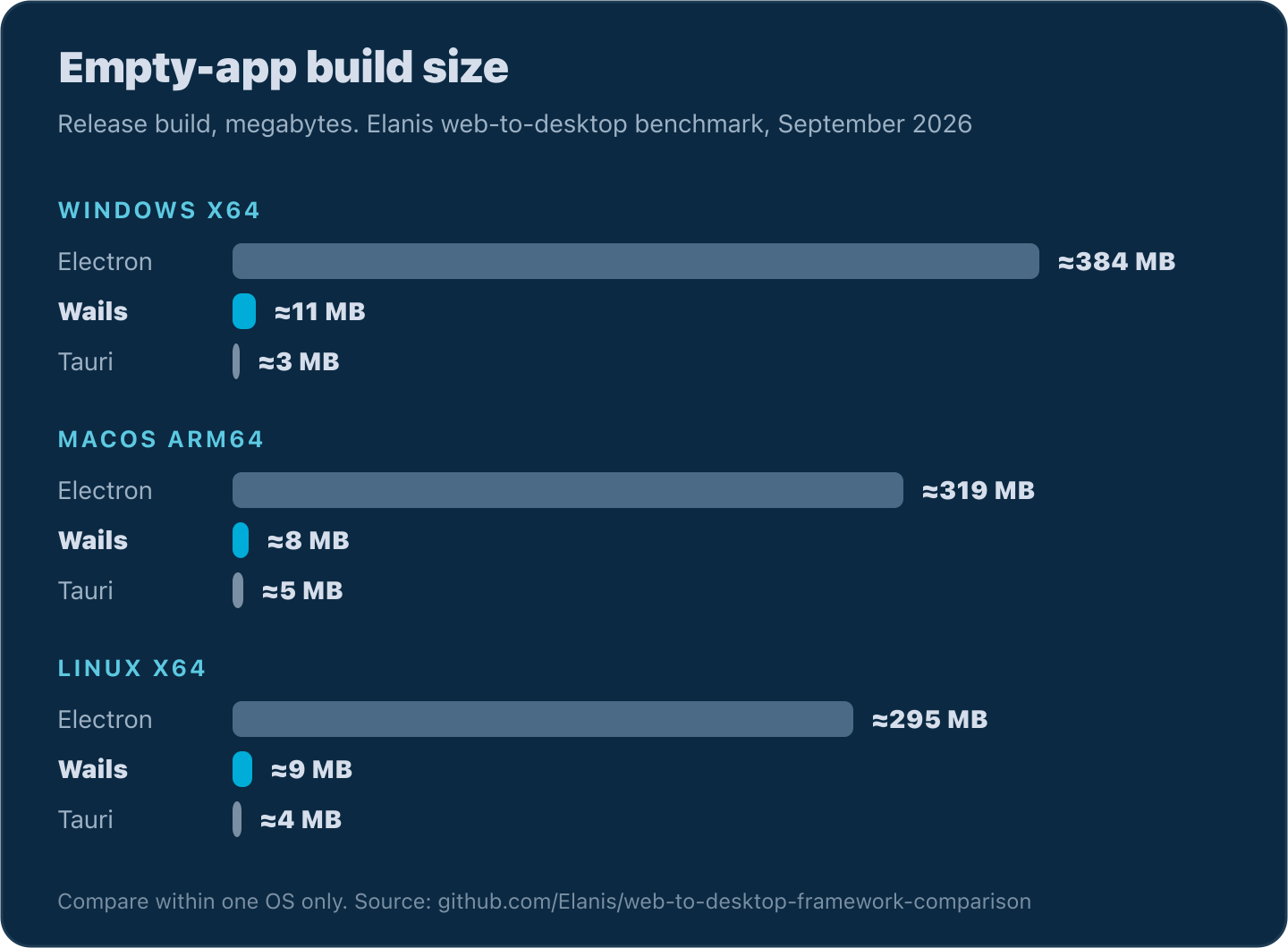
Much smaller, but not always lighter. The best public numbers come from the Elanis web-to-desktop framework comparison, which builds an empty app in each framework in release mode on GitHub CI and measures size, memory and startup. It was updated on September 4, 2026 (Elanis benchmark, 2026).
| Metric | OS | Electron | Wails | Tauri |
|---|---|---|---|---|
| Build size | Windows x64 | ~384 MB | ~11 MB | ~3 MB |
| Build size | macOS arm64 | ~319 MB | ~8 MB | ~5 MB |
| Build size | Linux x64 | ~295 MB | ~9 MB | ~4 MB |
| Memory | Windows x64 | ~278 MB | ~323 MB | ~317 MB |
| Memory | macOS arm64 | ~369 MB | ~100 MB | ~95 MB |
| Memory | Linux x64 | ~586 MB | ~360 MB | ~94 MB |
| Startup | Windows x64 | ~206 ms | ~559 ms | ~711 ms |
| Startup | macOS arm64 | ~640 ms | ~1,740 ms | ~2,044 ms |
| Startup | Linux x64 | ~204 ms | ~263 ms | ~30,325 ms |
Source: Elanis web-to-desktop-framework-comparison, updated 2026-09-04. Empty app, release build, GitHub CI. Compare frameworks within the same OS only. The README doesn't list framework versions.
Size is where Wails wins outright. An empty Wails app is roughly 35 times smaller than Electron on Windows, 40 times smaller on macOS and 33 times smaller on Linux. On a slow hotel connection, 11 MB downloads in seconds and 384 MB takes minutes. It also adds up when every tool on a laptop carries its own Chromium.
Memory depends on the operating system. On macOS, Wails used about 3.7 times less memory than Electron. On Linux it used about 1.6 times less. On Windows it used more, about 323 MB against Electron's 278 MB. The benchmark doesn't break that down, but WebView2 uses the Microsoft Edge engine, which is Chromium-based, and runs its own browser processes. So on Windows you probably still pay for a Chromium engine in memory, even though you don't ship one.
Electron started faster everywhere in this benchmark. On Windows it launched in about 206 ms against Wails' 559 ms. On macOS the gap was 640 ms against 1,740 ms. On Linux the two were close, 204 ms against 263 ms. An empty app on a CI runner is a rough signal and won't match what your users see. Still, the data doesn't support the claim that Wails always starts faster.
One more Windows caveat. Wails apps need the Microsoft WebView2 Runtime. It ships with Windows 11, and Microsoft says "the vast majority of Windows 10 devices have the WebView2 Runtime installed already" (Microsoft Learn, 2026). Embedding the bootstrapper covers the rest and adds about 150 KB (Wails Windows guide, 2026). If you need a pinned engine, though, Microsoft warns that "the Fixed Version binaries are over 250 MB and will make your app package larger by that amount." That wipes out most of the size advantage on Windows.
What does Wails code look like?
Here's a small log viewer you might build for your team: pick a log file, show the last 200 lines, then stream new lines as they're written. It also pings a service's health endpoint. All of it runs in Go, and the frontend just renders.
The Go side is a plain struct with exported methods. TailLog reads a file with os and bufio. CheckHealth calls an HTTP endpoint with a timeout using net/http, which the HTTP course covers. The code below compiles against Wails v2.14.0:
example.gogo// app.go
package main

import (
	"bufio"
	"context"
	"fmt"
	"net/http"
	"os"
	"sync"
	"time"
)

const tailLines = 200

type App struct {
	ctx        context.Context
	mu         sync.Mutex
	stopFollow context.CancelFunc
}

func NewApp() *App { return &App{} }

// startup is called by Wails once the app is running. Keep the context:
// runtime calls like EventsEmit need it.
func (a *App) startup(ctx context.Context) {
	a.ctx = ctx
}

// TailLog returns the last 200 lines of the log file at path.
func (a *App) TailLog(path string) ([]string, error) {
	f, err := os.Open(path)
	if err != nil {
		return nil, fmt.Errorf("open log: %w", err)
	}
	defer f.Close()

	lines := make([]string, 0, tailLines)
	sc := bufio.NewScanner(f)
	sc.Buffer(make([]byte, 0, 64*1024), 1024*1024) // allow long JSON log lines
	for sc.Scan() {
		if len(lines) == tailLines {
			lines = lines[1:]
		}
		lines = append(lines, sc.Text())
	}
	if err := sc.Err(); err != nil {
		return nil, fmt.Errorf("read log: %w", err)
	}
	return lines, nil
}

// CheckHealth calls a service's health endpoint and returns the status code.
func (a *App) CheckHealth(url string) (int, error) {
	ctx, cancel := context.WithTimeout(a.ctx, 3*time.Second)
	defer cancel()

	req, err := http.NewRequestWithContext(ctx, http.MethodGet, url, nil)
	if err != nil {
		return 0, fmt.Errorf("build request: %w", err)
	}
	resp, err := http.DefaultClient.Do(req)
	if err != nil {
		return 0, fmt.Errorf("health check %s: %w", url, err)
	}
	defer resp.Body.Close()
	return resp.StatusCode, nil
}
main embeds the built frontend and hands the struct to Bind. Wails v2 lives at github.com/wailsapp/wails/v2:
example.gogo// main.go
package main

import (
	"embed"
	"log"

	"github.com/wailsapp/wails/v2"
	"github.com/wailsapp/wails/v2/pkg/options"
	"github.com/wailsapp/wails/v2/pkg/options/assetserver"
)

//go:embed all:frontend/dist
var assets embed.FS

func main() {
	app := NewApp()

	err := wails.Run(&options.App{
		Title:  "Log Viewer",
		Width:  1100,
		Height: 720,
		AssetServer: &assetserver.Options{
			Assets: assets,
		},
		OnStartup: app.startup,
		Bind:      []interface{}{app},
	})
	if err != nil {
		log.Fatal(err)
	}
}
Run wails dev and Wails generates frontend/wailsjs/go/main/App.js and App.d.ts. The declarations look like this:
example.tstsexport function TailLog(arg1: string): Promise<Array<string>>;
export function CheckHealth(arg1: string): Promise<number>;
Every bound method returns a Promise. If the Go method returns a non-nil error, the Promise rejects with it. So the frontend uses plain await and try/catch:
example.tstsimport { TailLog, CheckHealth } from "../wailsjs/go/main/App";

async function openLog(path: string) {
  try {
    const lines = await TailLog(path);
    renderLines(lines);
  } catch (err) {
    showError(`Could not read ${path}: ${err}`);
  }
}

async function refreshStatus(url: string) {
  try {
    const status = await CheckHealth(url);
    setStatus(status === 200 ? "healthy" : `HTTP ${status}`);
  } catch (err) {
    setStatus(`down: ${err}`);
  }
}
You don't keep channel names in sync or check message shapes by hand. Change a Go method's signature and the regenerated declaration changes with it, so a type-checked frontend build flags the stale calls.
Streaming new lines with runtime events
Tailing a live file is where Go's concurrency helps. FollowLog seeks to the end of the file, then a goroutine polls for new lines and pushes each one to the frontend with runtime.EventsEmit. Opening another file cancels the previous follower:
example.gogo// follow.go
package main

import (
	"bufio"
	"context"
	"fmt"
	"io"
	"os"
	"strings"
	"time"

	"github.com/wailsapp/wails/v2/pkg/runtime"
)

// FollowLog streams lines appended to path as "log:line" events.
func (a *App) FollowLog(path string) error {
	f, err := os.Open(path)
	if err != nil {
		return fmt.Errorf("open log: %w", err)
	}
	if _, err := f.Seek(0, io.SeekEnd); err != nil {
		f.Close()
		return fmt.Errorf("seek log: %w", err)
	}

	a.mu.Lock()
	if a.stopFollow != nil {
		a.stopFollow()
	}
	ctx, cancel := context.WithCancel(a.ctx)
	a.stopFollow = cancel
	a.mu.Unlock()

	go a.follow(ctx, f)
	return nil
}

func (a *App) follow(ctx context.Context, f *os.File) {
	defer f.Close()

	r := bufio.NewReader(f)
	var partial strings.Builder
	ticker := time.NewTicker(500 * time.Millisecond)
	defer ticker.Stop()

	for {
		select {
		case <-ctx.Done():
			return
		case <-ticker.C:
			for {
				chunk, err := r.ReadString('\n')
				partial.WriteString(chunk)
				if err != nil {
					break // no complete line yet, try again on the next tick
				}
				line := strings.TrimRight(partial.String(), "\r\n")
				runtime.EventsEmit(a.ctx, "log:line", line)
				partial.Reset()
			}
		}
	}
}
On the frontend, subscribe once with EventsOn:
example.tstsimport { FollowLog } from "../wailsjs/go/main/App";
import { EventsOn } from "../wailsjs/runtime/runtime";

EventsOn("log:line", (line: string) => appendLine(line));

await FollowLog("/var/log/payments-api/app.log");
In Electron you'd write the same feature with fs in the main process, an ipcMain.handle for the read, a webContents.send for each new line, and a preload script exposing both through contextBridge. In Wails it's one Go struct and one event name. This version doesn't handle log rotation. A production follower would reopen the file when its size shrinks.
Wails v3 changes the shape a little. You register services in application.Options.Services with application.NewService(&LogService{}), and the frontend imports generated code from a bindings directory instead of wailsjs (Wails v3 bindings, 2026). Methods on a Go type are still what the frontend calls.
How does the security model differ?
Electron's security depends on a checklist, and Wails starts with a smaller surface. Electron's own security guide asks you to keep Node integration off for remote content (the default since 5.0.0), keep context isolation on (default since 12.0.0), keep process sandboxing on (default since 20.0.0), validate the sender of every IPC message, set a Content Security Policy, and expose APIs to the page only through contextBridge (Electron security, 2026).
Those defaults are good now, but each one is a flag your code can switch off. And because every app bundles Chromium, a browser bug stays in your installed app until you ship an update built on a patched Electron.
Wails removes several of those items by design. There's no Node.js in the page, so there's no nodeIntegration to misconfigure. The page gets your bound Go methods plus the Wails runtime API, and nothing else from the host. It can't read files or spawn processes unless one of your methods does it. Because the webview belongs to the OS, its security fixes arrive through the self-updating Evergreen WebView2 runtime on Windows, macOS updates or your Linux distribution's packages, not through your release pipeline. If you pin a Fixed Version runtime on Windows, patching is back on you.
Some risk remains. Every bound method is an API, and the page calling it may render content you don't control. In the log viewer above, TailLog accepts any path. If your app ever displays untrusted HTML, that's a file-read primitive. Validate arguments in Go the same way you'd validate an HTTP handler's input: restrict paths to allowed directories and URLs to known hosts. A CSP still matters too, because the page can still make network requests like any browser page.
For the related question of what a Node dependency can do at install time, see Is Go Safer Than Node.js Against Supply Chain Attacks?.
Where does Wails cost you?
Wails trades one bundled browser for three different webviews, and that has costs. Microsoft notes that with the Evergreen WebView2 Runtime you should set up testing for forward compatibility, because the engine updates underneath your app (Microsoft Learn, 2026). On macOS you're targeting WebKit, the engine behind Safari, so test there any CSS or web API you've only checked in Chrome.
Linux is the roughest platform. The Wails Linux guide lists known problems: the video ended event doesn't fire because of a WebKitGTK bug, you may see "GStreamer element autoaudiosink not found," and "WebKit installs signal handlers that interfere with Go's panic recovery mechanism" (Wails Linux guide, 2026). There's also an ABI split. Debian 11, Ubuntu 20.04 and RHEL 8 to 9 need the legacy WebKitGTK 4.0, so you pick between the webkit2_41 and webkit2_40 build tags (Wails distro support, 2026). A February 2026 v3 issue reports a blank window on X11 with Nvidia, worked around with WEBKIT_DISABLE_DMABUF_RENDERER=1 (Wails issue #4985, 2026).
Other costs to know about:
- v2 is single-window. The v3 migration guide says v2 "supported only a single window per application," while v3 "introduces native multi-window support as a core feature" (Wails v2 to v3 guide, 2026).
- v3 is still beta. The latest is v3.0.0-beta.25 from September 22, 2026. Its release notes say "The API is stable, but you may still encounter issues before the final 3.0 release" (Wails releases, 2026). The migration guide adds that "v2 remains the current stable release."
- The ecosystem is smaller. There are fewer plugins, and when you hit an odd bug there's a smaller chance someone has already written up the fix.
- Migration docs are thin. The "from Electron" page in the v3 docs is currently a placeholder.
What about Tauri?
Tauri is the other major webview framework. It describes itself as "a framework for building tiny, fast binaries for all major desktop and mobile platforms," uses "the web view already available on every user's system," and has a Rust backend (Tauri, 2026). Tauri 2.0 went stable on October 2, 2024 (Tauri blog, 2024).
In the Elanis benchmark, Tauri produced the smallest builds (about 3 to 5 MB) and used the least memory on Linux. It also had the slowest startup on every OS, including about 30 seconds on the Linux CI runner. Tauri and Wails share the same webview trade-offs, so the choice mostly comes down to the backend language. If your team writes Rust, use Tauri. If your team writes Go, use Wails.
How do you migrate an Electron app to Wails?
Keep your frontend and replace the main process. Wails has no official Electron migration guide yet, so plan the work by mapping each Electron piece to its Go equivalent:
| Electron | Wails (Go) |
|---|---|
ipcMain.handle + ipcRenderer.invoke via preload | Exported method on a bound struct, called from generated bindings |
fs | os, io, bufio, path/filepath |
child_process | os/exec |
fetch / axios in the main process | net/http with a context timeout |
webContents.send + ipcRenderer.on | runtime.EventsEmit + EventsOn |
electron-builder | wails build, with -nsis for a Windows installer |
A practical order:
- Move the frontend as-is. Point Wails at your existing Vite or webpack build output. Most components don't need to change. Only the call sites that talk to the preload API do, and step 2 handles those.
- Port one IPC channel at a time. Each
ipcMain.handlebecomes a Go method. Delete the matching preload entry and switch the call site to the generated import. - Replace push messages with events. Anything sent with
webContents.sendbecomesruntime.EventsEmit. - Rebuild your packaging.
wails buildcompiles "a production-ready binary," and flags like-nsis,-webview2and-platformcover installers, WebView2 strategy and cross-targets (Wails CLI, 2026). The signing guide covers macOS notarization and Windows SignTool, including GitHub Actions. - Test on all three webviews. This step is new work compared with Electron, so budget time for it.
The Go you write in step 2 is mostly standard library code. If os, net/http and encoding/json are new to you, the HTTP course and the data formats course cover the parts a desktop backend uses.
Where LevelUpGo fits
The log viewer above leans on Go fundamentals: functions, multiple return values, error handling and the standard library. The Go Basics course on LevelUpGo teaches them with a real editor next to every lesson, and your code has to pass tests before you move on. The goroutine and context work in FollowLog is covered in Concurrency Fundamentals. When you want more reps, the Training Ground has standalone exercises.
If you're still deciding whether Go is worth your time, start with Is Go Worth Learning in 2026?. For where Go already runs in production, see Where Is Go Used?, and for the server side, Best Programming Language for Backend Development.
FAQ
Is Wails better than Electron?
For most small and medium desktop apps, yes. In the Elanis benchmark an empty Wails app was 30 to 40 times smaller than an Electron app (Elanis benchmark, 2026), and you get a Go backend with typed bindings. Electron is still better when you need identical Chromium rendering or Node native modules.
Does Wails use less memory than Electron?
It depends on the OS. In the same benchmark, Wails used about 100 MB against Electron's 369 MB on macOS and 360 MB against 586 MB on Linux. On Windows it used more, about 323 MB against 278 MB, likely because WebView2 uses the Chromium-based Microsoft Edge engine and runs its own browser processes.
Is Wails production ready?
Wails v2 is the stable release, with v2.14.0 shipped on August 10, 2026 (Wails releases, 2026). Apps like Tiny RDM run on it. Wails v3 is in beta. Its docs say applications are running in production with it but advise testing thoroughly before deployment.
Do Wails apps work on Windows 10?
Yes, as long as the WebView2 Runtime is installed. Microsoft says the vast majority of Windows 10 devices already have it (Microsoft Learn, 2026). For the rest, Wails can embed a bootstrapper or download the runtime at install time using the -webview2 build flag.
Can I keep my React frontend when moving to Wails?
Yes. Wails serves any built web frontend from files embedded in the Go binary, so React, Vue, Svelte and plain HTML all work. What changes is how the frontend talks to the backend. IPC calls become imports of generated functions, and pushed messages become runtime events.
Sources
- Elanis, web-to-desktop-framework-comparison (updated 2026-09-04)
- Wails, Introduction
- Wails on GitHub
- Wails, How does it work?
- Wails v2.14.0 release
- Wails v3.0.0-beta.25 release
- Wails v3, Migrating from v2
- Wails v3, Binding methods
- Wails CLI reference
- Wails signing guide
- Wails Windows guide
- Wails Linux guide
- Wails Linux distro support
- Wails issue #4985, blank window on Linux X11 with Nvidia
- Wails showcase
- Tiny RDM
- Microsoft Learn, Distribute your app and the WebView2 Runtime
- Electron docs
- Electron, Process model
- Electron, Release timelines
- Electron release schedule
- Electron, Security checklist
- Electron apps showcase
- Tauri, Start
- Tauri 2.0 announcement (2024)